Operations
Blobs can be interacted with through familiar file system operations such as uploading, reading, downloading, and deleting.
Upload
Use the following command to upload a file to Walrus
$ walrus store file.txt --epochs 2 --context testnet
All blobs stored in Walrus are public and discoverable by all. Do not store secrets or private data without additional confidentiality measures, such as encrypting with Seal.
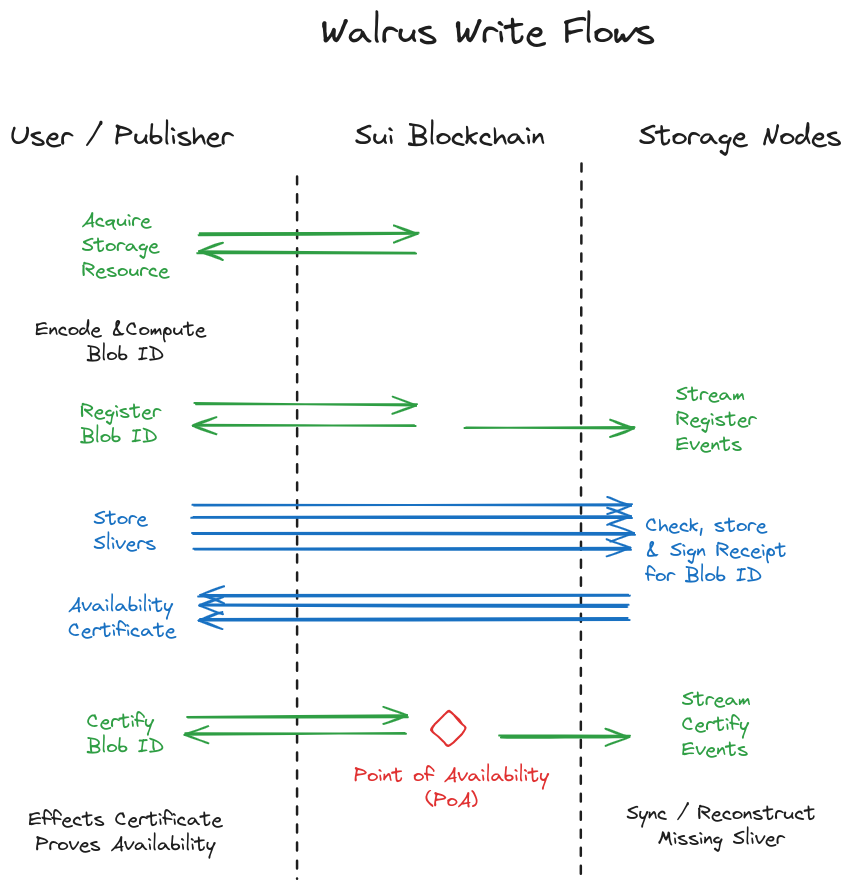
When you run this command, the steps executed by the client are:
-
Acquire a storage resource of appropriate size and duration onchain, either directly from the Walrus system object or a secondary market. Storage resources can be split, merged, and transferred.
-
Apply erasure coding to the blob, then compute the blob ID from the encoded data. The blob ID is a
u256value typically encoded as a URL-safe base64 string. You can perform the remaining steps yourself or delegate them to a publisher. -
Interact with Sui to update a storage resource and register the blob ID with the desired size and lifetime. This emits an event that storage nodes receive; the upload continues after event confirmation. Metadata is the only blob element ever exposed to Sui or its validators, as the content of blobs is always stored off-chain on Walrus storage nodes and caches. The storage nodes or caches do not need to overlap with any Sui infrastructure components (such as validators), and the storage epochs can have different lengths and timing than Sui epochs.
-
Send blob metadata to all storage nodes. Each sliver is sent to the storage node managing its corresponding shard.
-
Each storage node receives its sliver, verifies it against the blob ID, and checks that a valid blob resource authorizes the store. If correct, it signs a statement confirming it holds the sliver. Collect these signatures and aggregate them into an availability certificate.
-
Submit the availability certificate to the chain. Successful onchain verification emits an availability event (the point of availability (PoA)) and triggers all storage nodes to download any missing shards. After the PoA, storage nodes sync and recover missing metadata and slivers without your involvement.
The certificate of availability is created from 2/3 of the returned shard signatures. The erasure code rate is below 1/3, meaning that reconstruction is possible even if only 1/3 of shards return the sliver for a read. Because at most 1/3 of the storage nodes can fail, this ensures reconstruction if you request slivers from all storage nodes. A publisher can mediate the full process by receiving a blob and driving the process to completion.
-
Read completion: After the PoA for a blob ID, any correct user performing a read within the availability period eventually terminates and receives a value (V). This value is either the blob contents (F) or
None. -
Read consistency: After the PoA, if 2 correct users perform reads and receive values (V) and (V') respectively, then (V = V'). All correct readers see the same value.
-
Correct storage guarantee: A correct user with an appropriate storage resource can always perform a store operation for a blob (F) with a blob ID and advance the protocol until the PoA.
-
Correct blob retrieval: A read after the PoA for a blob (F) stored by a correct user returns (F). Correctly stored blobs are always retrievable.
These steps are also performed by a publisher that accepts and publishes blobs through HTTP.
Maximum blob size
The maximum blob size can be queried through the walrus info CLI command. The maximum blob size is currently 13.3 GB. You can store larger blobs by splitting them into smaller chunks.
Blobs are stored for the number of epochs specified at the time they are stored. Walrus storage nodes ensure the blob is available through the number of epochs specified. Mainnet uses an epoch duration of 2 weeks.
Read
To read a blob after it has been stored on Walrus, use the walrus read command and provide the blob ID:
$ walrus read <blob-id> --context testnet
Reading a blob does not save it to a local storage location. See download for more information.
Read operations are performed by the client or the aggregator service that exposes an HTTP interface to read blobs. Reads are resilient and succeed in recovering the blob if up to 1/3 of storage nodes are unavailable. In most cases, after synchronization is complete, blobs can be read even if 2/3 of storage nodes are down.
Reading blobs from Walrus can occur directly or through aggregators and caches. The operations are identical whether performed by end users, aggregators, or caches experiencing cache misses. In practice, most reads occur through caches for frequently accessed blobs and do not require requests to storage nodes.
The read flow uses the following steps:
-
The network uses the blob ID to obtain the metadata for the blob ID from any storage node and authenticate it using the blob ID.
-
The system object on Sui is queried to determine the storage nodes that store that blob's metadata and slivers.
-
A request is sent to the storage nodes for the shards corresponding to the blob ID. The request waits for (f+1) responses. Sufficient requests are sent in parallel to ensure low latency for reads.
-
The returned slivers are authenticated with the blob ID, the blob is reconstructed, and the contents are determined to be either valid or inconsistent.
-
Optionally, the result is cached and can be served without reconstruction until it is evicted from the cache. Requests to the cache for the blob return the blob contents or an inconsistency proof.
Download
To download a blob and save it on your local machine, run the following command:
$ walrus read <blob-id> --out file.txt --context testnet
Replace <blob-id> with the blob's identifier that the walrus store command returns in its output, and replace file.txt with the name and file extension for storing the file locally.
Certify availability
Once a blob is certified, Walrus ensures that sufficient slivers are always available on storage nodes to recover it within the specified epochs.
You can verify blob availability in 3 ways:
-
Using the certified blob event: Use a Sui SDK read to authenticate the certified blob event emitted when the blob ID was certified on Sui. The
walrus blob-statuscommand identifies the event ID to check. -
Using the blob object: Use a Sui SDK read to authenticate the Sui blob object corresponding to the blob ID, verify it is certified, before the expiry epoch, and not deletable.
-
Using a smart contract: A Sui smart contract can read the blob object on Sui to verify it is certified, before the expiry epoch, and not deletable.
The underlying protocol of the Sui light client returns digitally signed evidence for emitted events or objects, and can be used by offline or non-interactive applications as a proof of availability for the blob ID for a certain number of epochs.
Delete
To delete a blob, run the following command:
$ walrus delete --blob-id <blob-id> --context testnet
Replace <blob-id> with the blob's identifier that the walrus store command returns in its output.
Stored blobs can be set as deletable by the user that creates them. This metadata is stored in the Sui blob object, and whether a blob is deletable is included in certified blob events. A deletable blob can be deleted by the owner of the blob object to reclaim and reuse the storage resource associated with it.
If no other copies of the blob exist on Walrus, deleting a blob eventually makes it unrecoverable using read commands. However, if other copies of the blob exist on Walrus, a delete command reclaims storage space for the user that invoked it but does not make the blob unavailable until all other copies have been deleted or expire.
Use Sui object and blob ID utilities
The command walrus blob-id <FILE> derives the blob ID of any file. The blob ID is a commitment to the file, and any blob with the same ID decodes to the same content. The blob ID is a 256-bit number and represented on some Sui explorers as a large decimal number. The command walrus convert-blob-id <BLOB_ID_DECIMAL> converts it to a base64 URL for use by the command line tools and other APIs.
The walrus list-blobs command lists all non-expired Sui objects that the current account owns, including their blob ID, object ID, and metadata about expiration and deletable status. The --include-expired option also lists expired Sui objects.
The Sui storage cost associated with Sui objects can be reclaimed by burning the Sui object. This does not cause the Walrus blob to be deleted, but means that operations such as extending its lifetime, deleting it, or modifying attributes are no longer available. The walrus burn-blobs --object-ids <SUI_OBJ_IDS> command burns a specific list of Sui object IDs. The --all flag burns the Sui objects for all blobs under the user account, and --all-expired burns all expired blobs under the user account.
Extend a blob's storage duration
Because no blob content is involved, refresh operations are conducted entirely through the Sui protocol. To extend a blob's storage duration, you must reference the Sui object ID and indicate how many epochs you want to extend the blob's storage for.
Run the following command to extend a blob's storage duration by 3 epochs. You must use the Sui object ID, not the blob ID:
$ walrus extend --blob-obj-id <blob-object-id> --epochs-extended 3 --context testnet
Replace <blob-object-id> with the blob's Sui object ID that the walrus store command returns in its output. Upon success, storage nodes receive an emitted event to extend the storage duration for each sliver.
Manage blob attributes
Walrus allows a set of key-value attribute pairs to be associated with a Sui object. While the keys and their values can be arbitrary strings to accommodate any needs, specific keys are converted to HTTP headers when serving blobs through aggregators. Each aggregator can decide which headers it allows through the --allowed-headers CLI option. You can view the defaults through walrus aggregator --help.
The following command sets attributes key1 and key2 to values value1 and value2, respectively. The command walrus get-blob-attribute <blob-object-id> returns all attributes associated with a blob ID.
$ walrus set-blob-attribute <blob-object-id> --attr "key1" "value1" --attr "key2" "value2"
The following command deletes the attributes with keys listed, separated by commas or spaces. All attributes of a Sui object can be deleted by the command walrus remove-blob-attribute <blob-object-id>.
$ walrus remove-blob-attribute-fields <blob-object-id> --keys "key1,key2"
Attributes are associated with Sui object IDs rather than the blobs themselves on Walrus. This means that gas for storage is reclaimed by deleting attributes and that the same blob contents can have different attributes for different Sui objects with the same blob ID.
Inconsistency handling
After the PoA, a correct storage node attempting to reconstruct a sliver might fail if blob encoding was incorrect. In this case, the node can extract an inconsistency proof for the blob ID. It then uses the proof to create an inconsistency certificate and uploads it onchain.
Inconsistency handling uses the following process:
-
A storage node fails to reconstruct a sliver and computes an inconsistency proof.
-
The storage node sends the blob ID and inconsistency proof to all storage nodes of the Walrus epoch. The storage nodes verify the proof and sign it.
-
The storage node that found the inconsistency aggregates the signatures into an inconsistency certificate and sends it to the Sui smart contract, which verifies it and emits an inconsistent resource event.
-
Upon receiving an inconsistent resource event, correct storage nodes delete sliver data for the blob ID and record in the metadata to return
Nonefor the blob during the availability period. No storage attestation challenges are issued for this blob ID.
Reading inconsistent blobs
A blob ID marked as inconsistent always resolves to None upon reading. This occurs because the read process re-encodes the received blob to verify that the blob ID was derived from consistent encoding.
An inconsistency proof reveals only a true fact to storage nodes (which do not otherwise run decoding) and does not change read output in any case.
However, partial reads that use the systematic nature of the encoding might successfully return partial data for inconsistently encoded files. If consistency and availability of reads is important, perform full reads rather than partial reads.
Challenge mechanism for storage attestation
During an epoch, a correct storage node challenges all shards to provide symbols for blob slivers past PoA:
-
The list of available blobs for the epoch is determined by the sequence of Sui events up to the past epoch. Inconsistent blobs are not challenged, and a record proving this status can be returned instead.
-
A challenge sequence is determined by providing a seed to the challenged shard. The sequence is then computed based on the seed and the content of each challenged blob ID. This creates a sequential read dependency.
-
The response to the challenge provides the sequence of shard contents for the blob IDs in a timely manner.
-
The challenger node uses thresholds to determine whether the challenge was passed and reports the result onchain.
-
The challenge and response communication is authenticated.
Challenges provide reassurance that the storage node can actually recover shard data in a probabilistic manner, preventing storage nodes from receiving payment without any evidence they can retrieve shard data. The sequential nature of the challenge and a reasonable timeout also ensure that the process is timely.