Technical Overview
A Walrus Site is a static web site published entirely onchain, with no origin server. Sui stores the site's ownership and resource index, and Walrus stores the resource files themselves. A portal bridges these systems and serves the site to the browser over standard HTTP.
This page explains how those pieces fit together. For a description of each component in detail, see Walrus Sites Components.
Publishing a site
When you run site-builder deploy, the CLI tool performs 2 operations in sequence.
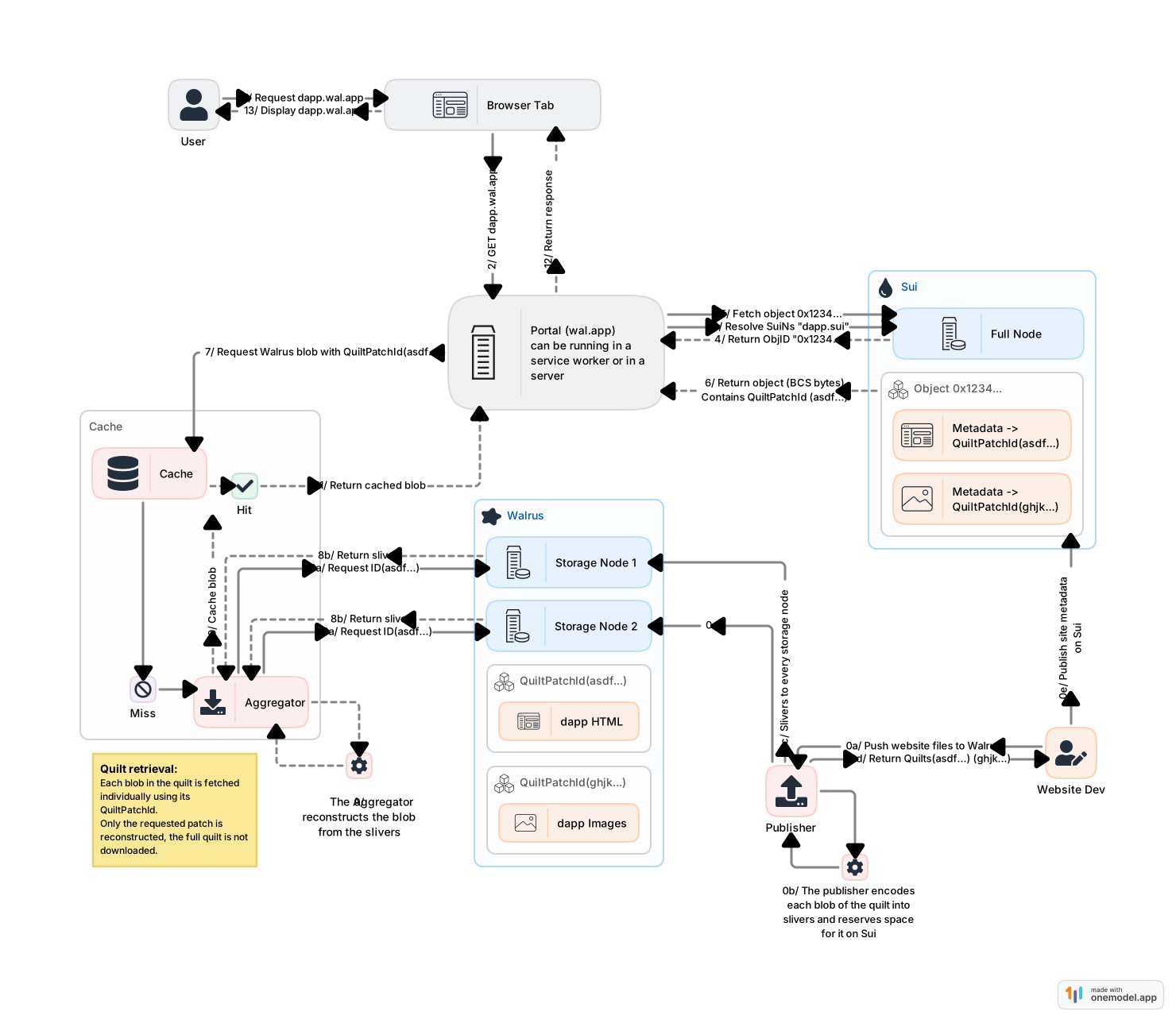
First, it uploads your site's files to Walrus by batching all files into a single storage unit called a Walrus quilt. Walrus returns a QuiltPatchID for each file.
Second, it writes a site object to Sui. This object acts as an onchain index: it records the URL path of every resource in your site alongside the Walrus identifier needed to retrieve it. The wallet that signs this transaction becomes the owner of the site object and is the only wallet that can update or destroy it.
After publishing, your site exists entirely onchain and in Walrus storage. No server is required to keep it available.
Resolving and serving a site
Visitors access a Walrus Site through a portal. A portal is a service that translates a browser request into Sui and Walrus lookups, then returns a standard HTTP response. Anyone can run a portal. The Mainnet portal at https://wal.app is operated by Mysten Labs.
When a visitor navigates to a Walrus Site URL, the portal works through the following sequence:
- Identify the site. The portal reads the subdomain of the request URL and resolves it to a Sui object ID. The subdomain is either a SuiNS name or a Base36-encoded object ID (see Domain isolation).
- Look up the resource. The portal fetches the site object's dynamic fields from Sui and finds the entry that matches the requested URL path. This entry contains the Walrus identifier for the resource and any custom response headers.
- Fetch the content. The portal retrieves the resource bytes from a Walrus aggregator using that identifier. Because site resources are stored as quilt patches, only the requested patch is reconstructed (the full quilt is not downloaded).
- Return the response. The portal sends the bytes back to the browser with the headers from the site object.
The portal repeats this sequence for every resource the browser subsequently requests, for example, stylesheets, scripts, or images referenced by index.html.
Domain isolation
Walrus Sites served through a shared portal must be isolated from each other. Without isolation, one site could read cookies or access wallet state from another. To enforce isolation, each site is served from a unique subdomain of the portal's domain so that the browser's same-origin policy keeps them separate.
The subdomain is derived from the site's Sui object ID in one of 2 ways:
- SuiNS name: A human-readable name registered through SuiNS and pointed at the site's object ID, for example
flatlandinhttps://flatland.wal.app. - Base36-encoded object ID: The full object ID re-encoded in Base36, which fits within the 63-character subdomain limit (a hex-encoded Sui object ID requires 64 characters) and is case-insensitive, unlike Base64 or Base58.
The wal.app portal does not support Base36 domain resolution. To access a site by its raw object ID, use a self-hosted portal or run a local portal.
Ownership and updates
Because a Walrus Site is a standard Sui object, it participates in Sui's ownership model. The owner can transfer, share, or destroy the site object, and can assign it a SuiNS name. Updating a site re-uploads all resource files to Walrus as a new quilt and updates the onchain index to point to the new content. The site's Sui object ID does not change between updates, so any SuiNS name or bookmark pointing to it remains valid.